Menu
Menu creates application menu bars and native standard menu items.
Appearance
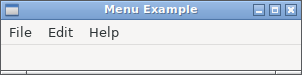
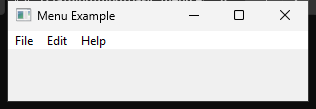

Runnable example
require "uing"

UIng.init

UIng::Menu.new("File") do
  append_item("Open") do
    set_shortcut('O', UIng::Modifiers::Primary)
    on_clicked do |window|
      window.try &.open_file
    end
  end
  append_separator
  append_preferences_item do
    on_clicked do |window|
      window.try &.msg_box("Preferences", "Preferences clicked")
    end
  end
  append_separator
  append_quit_item
end

UIng::Menu.new("Edit") do
  append_check_item("Check", checked: false) do
    on_clicked do |_menu_window|
      # No-op
    end
  end
  append_separator
  append_item("Click") do
    on_clicked do |window|
      window.try &.msg_box("Click", "Click menu clicked")
    end
  end
end

UIng::Menu.new("Help") do
  append_about_item do
    on_clicked do |window|
      window.try &.msg_box("About", "Menu example")
    end
  end
end

# Window must be created after menu finalized.
Window = UIng::Window.new("Menu Example", 300, 50, menubar: true) do
  on_closing do
    UIng.quit
    true
  end

  show
end

UIng.on_should_quit do
  Window.destroy unless Window.released?
  true
end

{% if flag?(:darwin) %}
  label = UIng::Label.new("The Mac menu bar is at the top of the screen.")
  Window.child = label
{% end %}

UIng.main

UIng.uninit
Usage notes
Menu items come in the following forms:
Type Factory method Purpose Regular item append_item(name)Runs a command. Check item append_check_item(name, checked:)Represents an on/off state. Read or change it with checked?andchecked=.Preferences item append_preferences_itemOpens application preferences. About item append_about_itemShows application information. Quit item append_quit_itemExits the application. Configure shutdown through UIng.on_should_quit.Separator append_separatorVisually separates related groups of items.
append_item, append_check_item, append_preferences_item, append_about_item, and append_quit_item also accept a block to configure the new MenuItem. Inside the block, you can call MenuItem methods directly or receive the item as |item|. These methods return the MenuItem regardless of the block's result.
UIng::Menu.new("File") do
  append_item("Open") do
    set_shortcut('O', UIng::Modifiers::Primary)
    on_clicked { |window| window.try &.open_file }
  end
end
For check items, use append_check_item("Labels", checked: true) do ... end to set the initial state. Quit items still reject on_clicked inside configuration blocks; configure shutdown with UIng.on_should_quit.
- Finalize all menus before creating the first Window, and set
menubar: true. - Assign a shortcut before creating the first Window with
item.set_shortcut('O', UIng::Modifiers::Primary).Primarymeans Command on macOS and Control on Windows/Linux. Useitem.clear_shortcutto remove it. - Shortcut keys are ASCII letters or digits,
UIng::ExtKey::F1–F12,Delete, or arrow keys. F1–F12 may be unmodified; other keys needPrimary,Ctrl, orAlt.Shiftmay be added.Super,Primary | Ctrl, and duplicate shortcuts are invalid. - Menu callbacks receive an optional Window because some platform-level actions may not have one.
item.clear_on_clickedis the same asitem.on_clicked(nil): it releases the click callback while keeping the item usable. Neither call removes the item from its menu. Quit items useUIng.clear_on_should_quitinstead.Preferences,About, andQuitare standard items that follow OS menu conventions. Their label, placement, and surrounding separators vary by OS, so they may not appear in the Menu or order where you add them.- You can add only one
append_preferences_item,append_about_item, andappend_quit_itemitem per application.