Form
Form aligns labels and controls into native form rows.
Appearance
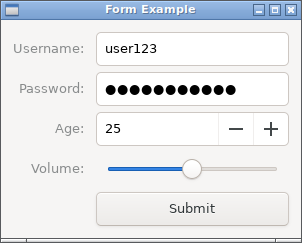
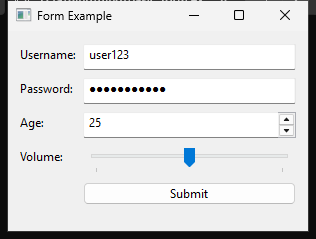
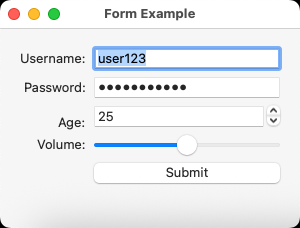
Runnable example
require "uing"

UIng.init

window = UIng::Window.new("Form Example", 300, 200, margined: true)
window.on_closing do
  UIng.quit
  true
end

form = UIng::Form.new(padded: true)

username_entry = UIng::Entry.new
username_entry.text = "user123"
form.append("Username:", username_entry)

password_entry = UIng::Entry.new(:password)
password_entry.text = "password123" # For demonstration
form.append("Password:", password_entry)

age_spinbox = UIng::Spinbox.new(0, 120)
age_spinbox.value = 25
form.append("Age:", age_spinbox)

volume_slider = UIng::Slider.new(0, 100)
volume_slider.value = 50
form.append("Volume:", volume_slider)

submit_button = UIng::Button.new("Submit")
submit_button.on_clicked do
  username = username_entry.text || ""
  age = age_spinbox.value
  volume = volume_slider.value
  message = "Username: #{username}\nAge: #{age}\nVolume: #{volume}"
  window.msg_box("Form Submitted", message)
end
form.append("", submit_button)

window.child = form
window.show

UIng.main
UIng.uninit
Usage notes
Each append adds a label and control as one row. stretchy: true grows the control into the extra height; the default false keeps its required height. Both fill the input column horizontally.
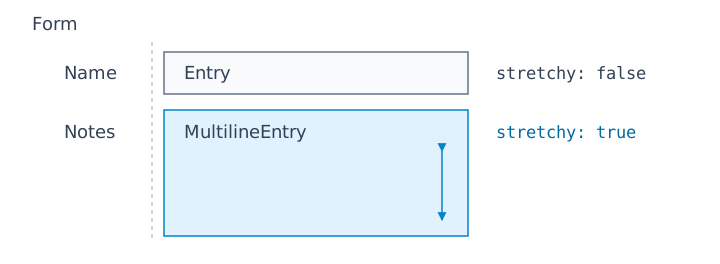
form = UIng::Form.new(padded: true)
form.append("Name", UIng::Entry.new)
form.append("Notes", UIng::MultilineEntry.new, stretchy: true)
padded: true adds row and column spacing. To grow a Form inside a vertical Box, use stretchy: true in the Box's append too.
Labels are left-aligned on Windows and right-aligned on Linux and macOS (see platform differences).