Toolbar
Toolbar adds native command buttons to a Window. It supports regular buttons, toggle buttons, separators, icons, tooltips, and several display modes.
Toolbar is an experimental feature specific to kojix2/libui-ng and may change.
Appearance
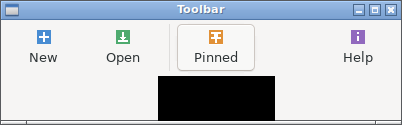
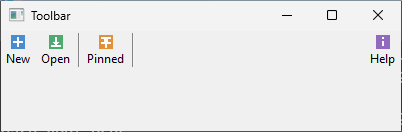
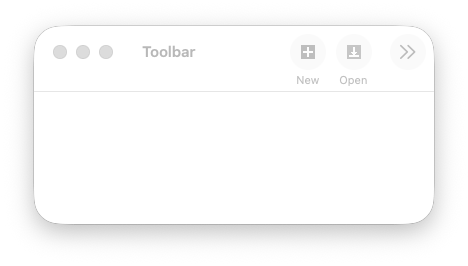
Runnable example
require "uing"
require "base64"
require "compress/zlib"

NEW_ICON  = "eNpjYKAcePRc+k8OprV+GBgp+okFtNI/0sN/oNL/KBi4MoxacTdq/9CyH1eZOGr/qP2j9g99+6kNRu0fWvaP5r9R+0ftH7V/tP07MuwfqQAAcYgRdg=="
OPEN_ICON = "eNrtlsENACEIBK3wSrnCbNJ73dOosIQQZxKfm0EhxNb8PP0dlhOd/yF/lp9x4l9lI+rfJSqfNf+Qt8NUvcNfy7+z3/Djx4+/ut+K8v5Kt/X9VW5P/xVu7/x53RXmXw3+Wn7+v3f5b+UD4HmCow=="
PIN_ICON  = "eNrtlksOABAMRN3KOR3RSdjaiKLU503S5XjBZHBuXjH4NDLafqlW+cupeaT7t/CfdH7leqP5ud0vzT+y6zCtu4N/Fl9b8O/itzpdytHOP3z4O/j0D/3Xk8Pd7z98+PDt+K/9/39VBiV4ujY="
HELP_ICON = "eNpjYKAcTMzc958cTGv9MDBQ+ke6/4e6/oGOP2L1j4KBK8OoFXej9g8t+9HBqP0jy/7R/Dea/0fz36j9o/aP2j9a/43WP6P2D237RyoAAGYovgE="

def decode_icon(data : String) : Bytes
  compressed = Base64.decode(data)
  io = IO::Memory.new(compressed)

  Compress::Zlib::Reader.open(io) do |zlib|
    zlib.getb_to_end
  end
end

def new_icon(data : String) : UIng::Image
  pixels = decode_icon(data)

  UIng::Image.new(16, 16) do
    append(pixels[0, 1024], 16, 16, 64)
    append(pixels[1024, 4096], 32, 32, 128)
  end
end

UIng.init

icons = [
  new_icon(NEW_ICON),
  new_icon(OPEN_ICON),
  new_icon(PIN_ICON),
  new_icon(HELP_ICON),
]

window = UIng::Window.new("Toolbar", 400, 100)
window.toolbar do
  UIng::Toolbar.new do |bar|
    bar.display_mode = UIng::Toolbar::DisplayMode::IconAndTextVertical

    append_button("New", icons[0]) do |item|
      item.tooltip = "New document"
      on_clicked { puts "New clicked" }
    end

    append_button("Open", icons[1]) do |item|
      item.tooltip = "Open document"
      on_clicked { puts "Open clicked" }
    end

    append_separator

    append_toggle_button("Pinned", icons[2]) do |item|
      item.tooltip = "Pin document"
      on_clicked { |clicked| puts "Pinned: #{clicked.checked? ? "yes" : "no"}" }
    end

    append_separator

    append_button("Help", icons[3]) do |item|
      item.tooltip = "Show help"
      on_clicked { puts "Help clicked" }
    end
  end
end
toolbar = window.toolbar || raise "Toolbar was not attached"
icons.each &.free

display_modes = UIng::Toolbar::DisplayMode.values
mode_selector = UIng::Combobox.new([
  "Icons only",
  "Icons and text (horizontal)",
  "Icons and text (vertical)",
  "Text only",
])
mode_selector.selected = 2
mode_selector.on_selected { |index| toolbar.display_mode = display_modes[index] }
window.child = mode_selector
window.margined = true

window.on_closing do
  UIng.quit
  true
end

window.show
UIng.main
UIng.uninit
Usage notes
Build items with Toolbar.new, then attach the Toolbar returned by the window.toolbar block. The Window block keeps its outer receiver.
window.toolbar do
  UIng::Toolbar.new do
    append_button("Open") do |item|
      item.tooltip = "Open document"
      on_clicked { |_clicked| puts "Open clicked" }
    end
    append_toggle_button("Pinned") do |item|
      item.checked = true
    end
  end
end
Item configuration blocks allow direct calls to ToolbarItem methods. Use |item| for property assignments. Toolbar.new returns the Toolbar; append_button and append_toggle_button return the ToolbarItem. The same blocks are supported when passing CrImage icons.
If a Toolbar.new block raises, the Toolbar is detached if necessary, the Toolbar and its items are freed, and the original exception is re-raised. If only an item configuration block on an existing Toolbar raises, the item remains appended.
- Add every item before attaching the Toolbar to a Window for the first time. After its first attachment, items cannot be added even if the Toolbar is detached.
display_modecan be changed after attachment. Existing items, click callbacks, enabled states, and toggle checked states are preserved when the mode changes.- A Toolbar can be attached to only one Window at a time. Destroying that Window also frees its attached Toolbar. Assign
niltowindow.toolbarbefore destroying the Window if you want to reuse the Toolbar. A detached Toolbar still needsfree. - Toolbar items copy their icons, including icons set later with
icon=. You may free an Image immediately after passing it to a Toolbar; the Toolbar frees its own copies. Assignnilbefore callingtoolbar.freeon an attached Toolbar. - Image retains its source pixel data to support copying, so large images use additional memory.
checked?andchecked=are available only on items created byappend_toggle_button.- On macOS,
IconAndTextHorizontalis displayed vertically.
Change the display mode of an attached Toolbar as follows. The runnable Gallery example also lets you switch modes using a combobox.
window.toolbar = toolbar
toolbar.display_mode = UIng::Toolbar::DisplayMode::TextOnly
toolbar.display_mode = UIng::Toolbar::DisplayMode::IconOnly
toolbar.display_mode = UIng::Toolbar::DisplayMode::IconAndTextVertical