Grid
Grid places controls at explicit rows and columns with spans, expansion, and alignment.
Appearance
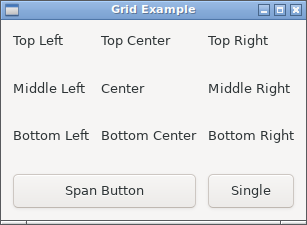
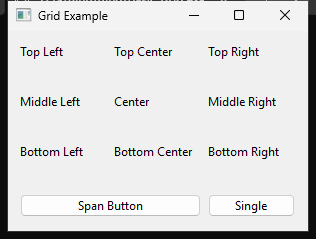
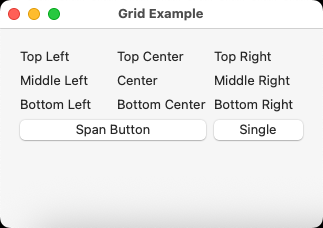
Runnable example
require "uing"

UIng.init

window = UIng::Window.new("Grid Example", 300, 200, margined: true)
window.on_closing do
  UIng.quit
  true
end

grid = UIng::Grid.new(padded: true)

# Create a simple 3x3 grid layout
labels = [
  "Top Left", "Top Center", "Top Right",
  "Middle Left", "Center", "Middle Right",
  "Bottom Left", "Bottom Center", "Bottom Right",
]

labels.each_with_index do |text, index|
  row = index // 3
  col = index % 3

  grid.append(left: col, top: row, hexpand: true, vexpand: true) do
    UIng::Label.new(text)
  end
end

# Add a button that spans 2 columns at the bottom
button = UIng::Button.new("Span Button")
button.on_clicked do
  window.msg_box("Grid Demo", "This button spans 2 columns!")
end
grid.append(button, left: 0, top: 3, xspan: 2, hexpand: true)

# Add another button in the remaining space
grid.insert_at(button, :trailing, hexpand: true) do
  UIng::Button.new("Single") do
    on_clicked do
      window.msg_box("Grid Demo", "Single column button!")
    end
  end
end

window.child = grid
window.show

UIng.main
UIng.uninit
Usage notes
left is the column and top is the row, both zero-based. xspan and yspan specify how many columns and rows a control occupies.
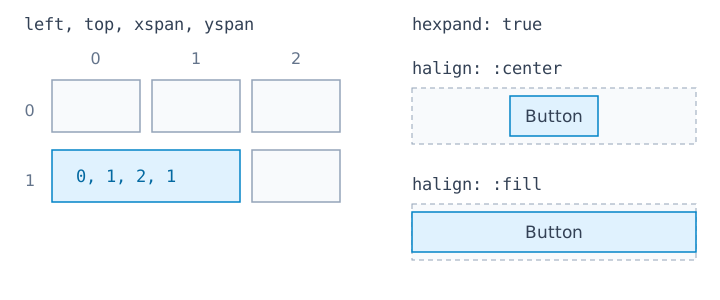
grid = UIng::Grid.new(padded: true)
grid.append(UIng::Button.new("Span"), left: 0, top: 1, xspan: 2, hexpand: true)
append and insert_at also accept a block that returns the child Control. The anchor passed to insert_at must already be a child of the same Grid.
anchor = UIng::Label.new("Name")
grid.append(left: 0, top: 0) { anchor }
grid.insert_at(anchor, :trailing, hexpand: true) do
  UIng::Entry.new
end
The defaults are xspan: 1, yspan: 1, hexpand: false, vexpand: false,
and :fill for both alignments. Spans must be at least 1. insert_at uses the
same defaults.
hexpand and vexpand expand columns and rows; halign and valign set placement within them. Dashed outlines show allocated space; blue rectangles show children.
| Horizontal settings | Behavior |
|---|---|
hexpand: true, halign: :fill |
Expands the column and fills its width with the child |
hexpand: true, halign: :center |
Expands the column and centers the child at its required width |
hexpand: false, halign: :fill |
Does not request column expansion, but fills the allocated width |
If another child expands the same column, a child with hexpand: false and :fill also grows. The vertical direction works the same way. :start and :end keep the required size at the start or end of the allocation.
padded: true adds standard spacing between cells.