Grid
Gridは行・列・結合範囲・拡張・配置を指定してコントロールを置きます。
表示例
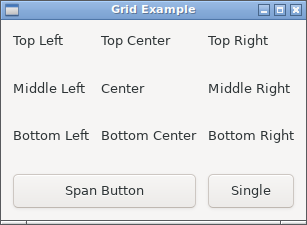
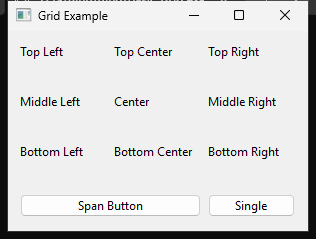
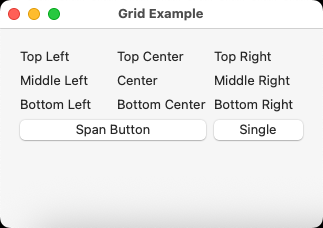
実行例
require "uing"

UIng.init

window = UIng::Window.new("Grid Example", 300, 200, margined: true)
window.on_closing do
  UIng.quit
  true
end

grid = UIng::Grid.new(padded: true)

# Create a simple 3x3 grid layout
labels = [
  "Top Left", "Top Center", "Top Right",
  "Middle Left", "Center", "Middle Right",
  "Bottom Left", "Bottom Center", "Bottom Right",
]

labels.each_with_index do |text, index|
  row = index // 3
  col = index % 3

  grid.append(left: col, top: row, hexpand: true, vexpand: true) do
    UIng::Label.new(text)
  end
end

# Add a button that spans 2 columns at the bottom
button = UIng::Button.new("Span Button")
button.on_clicked do
  window.msg_box("Grid Demo", "This button spans 2 columns!")
end
grid.append(button, left: 0, top: 3, xspan: 2, hexpand: true)

# Add another button in the remaining space
grid.insert_at(button, :trailing, hexpand: true) do
  UIng::Button.new("Single") do
    on_clicked do
      window.msg_box("Grid Demo", "Single column button!")
    end
  end
end

window.child = grid
window.show

UIng.main
UIng.uninit
使い方
leftは列、topは行で、どちらも0始まりです。xspanとyspanは使用する列数・行数を指定します。
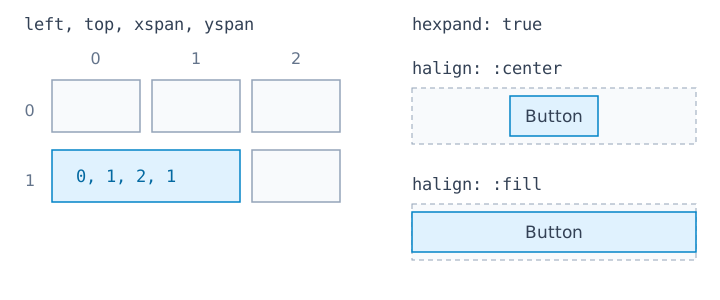
grid = UIng::Grid.new(padded: true)
grid.append(UIng::Button.new("Span"), left: 0, top: 1, xspan: 2, hexpand: true)
appendとinsert_atは、ブロックが返すControlを子として追加する形式も使えます。insert_atの基準になるControlは、同じGridの子を指定します。
anchor = UIng::Label.new("Name")
grid.append(left: 0, top: 0) { anchor }
grid.insert_at(anchor, :trailing, hexpand: true) do
  UIng::Entry.new
end
既定値はxspan: 1、yspan: 1、hexpand: false、vexpand: false、
両方向の配置は:fillです。スパンは1以上を指定します。insert_atも同じ既定値です。
hexpand・vexpandは列・行の拡張、halign・valignは領域内の配置を指定します。図の破線は割り当て領域、青い矩形は子です。
| 横方向の指定 | 動作 |
|---|---|
hexpand: true, halign: :fill |
列を広げ、子もその幅を満たす |
hexpand: true, halign: :center |
列を広げ、子は必要な幅で中央に置く |
hexpand: false, halign: :fill |
自身は列の拡張を要求せず、割り当てられた幅を満たす |
同じ列の別の子が列を広げれば、hexpand: falseでも:fillの子は広がります。縦方向も同様です。:start・:endは必要なサイズで先頭・末尾に配置します。
padded: trueでセル間に標準間隔を入れます。