Table
Table presents model-backed rows and native text, image, checkbox, progress, and button columns.
Appearance
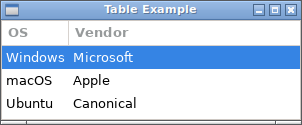
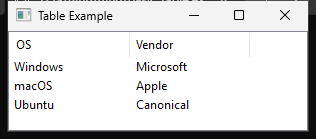
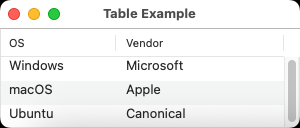
Runnable example
require "uing"

UIng.init

main_window = UIng::Window.new("Table Example", 400, 220, margined: true)

vbox = UIng::Box.new(:vertical, padded: true)
main_window.child = vbox

data = [
  %w[Windows Microsoft],
  %w[macOS Apple],
  %w[Ubuntu Canonical],
]

model_handler = UIng::Table::Model::Handler.new do
  num_columns { 2 }
  column_type { |_column| UIng::Table::Value::Type::String }
  num_rows { data.size }
  cell_value { |row, column| UIng::Table::Value.new(data[row][column]) }
  set_cell_value { |_row, _column, _value| }
end

table_model = UIng::Table::Model.new(model_handler)

table = UIng::Table.new(table_model) do
  append_text_column("OS", 0, editable: :never)
  append_text_column("Vendor", 1, editable: :never)
end
table.selection_mode = UIng::Table::Selection::Mode::ZeroOrOne

status = UIng::Label.new("Select a row")
table.on_selection_changed do |selection|
  if selection.num_rows == 0
    status.text = "No row selected"
  else
    row = selection.rows.first
    status.text = "Selected: #{data[row][0]} by #{data[row][1]}"
  end
end

vbox.append(table, true)
vbox.append(status)
main_window.show

main_window.on_closing do
  # Detach and destroy the table before freeing its model.
  vbox.delete(0)
  table.destroy    # Destroy table first
  table_model.free # Then free model

  UIng.quit
  true
end

UIng.main
UIng.uninit
Basic setup
Table::Model::Handler supplies data, which a Table displays through a Table::Model. See the runnable example above for initialization and window creation.
data = %w[Windows macOS Ubuntu]
handler = UIng::Table::Model::Handler.new do
  num_columns { 1 }
  column_type { |_column| UIng::Table::Value::Type::String }
  num_rows { data.size }
  cell_value { |row, _column| UIng::Table::Value.new(data[row]) }
  set_cell_value { |_row, _column, _value| }
end

model = UIng::Table::Model.new(handler)
table = UIng::Table.new(model) do
  append_text_column("OS", 0, editable: :never)
end
window.child = table
Row and model column indices start at zero. The 0 in append_text_column selects the model column to display. Model column counts and types are fixed at creation; cell values must match their column types.
In this chapter
This page covers the smallest useful setup. The following pages build on it with model callbacks and value ownership, columns/editing/selection, and data updates with destruction order.
- Models and data: the Model and Handler roles, types, and
Table::Valueownership - Columns, editing, and selection: adding columns, editable cells, selection, and click events
- Updates and lifetime: row notifications and safe cleanup